
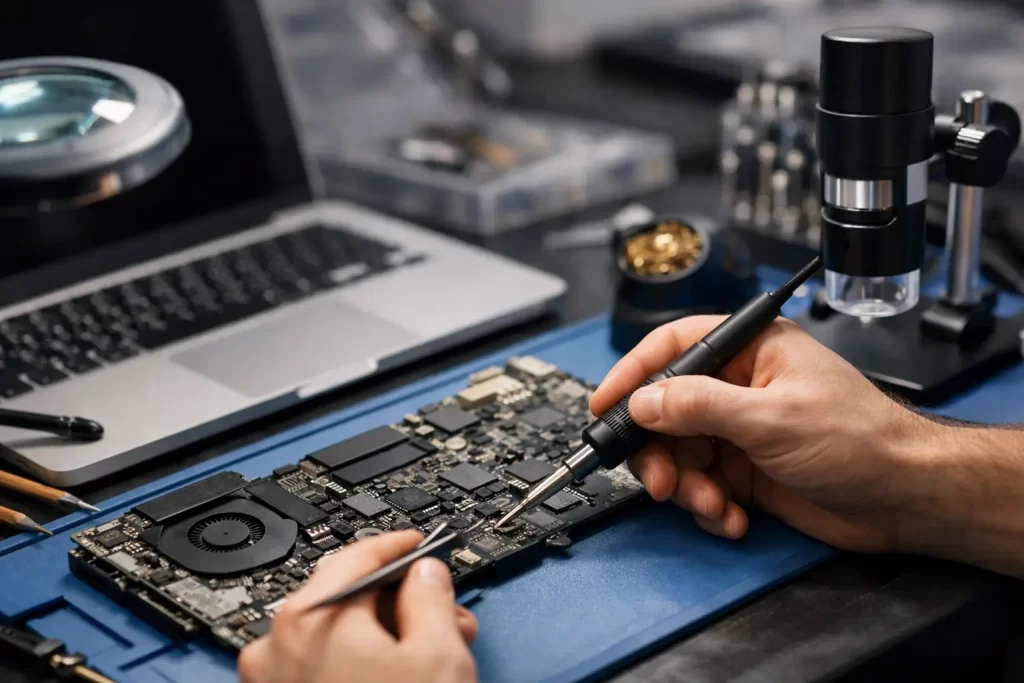
A MacBook that will not charge, shows no image, or dies after liquid exposure is not always headed for the scrap pile. A real MacBook motherboard repair example usually starts with a symptom that looks simple on the surface, then leads to board-level diagnostics, micro-soldering, and a decision about whether repair is faster and more cost-effective than replacement.
For most people, the problem starts at the worst possible time. You open the lid before work, plug in the charger, and nothing happens. Or the keyboard lights up but the screen stays black. Or the machine runs for ten minutes, then shuts off without warning. These faults often sit well beyond a battery swap or screen replacement. They point to the logic board, which is the MacBook’s main circuit board and the part that controls power, charging, storage communication, display output, and system start-up.
That sounds serious because it is. But serious does not always mean uneconomical. Board-level repair can restore a MacBook quickly when the fault is isolated and the data on the device matters.
A practical MacBook motherboard repair example
Take a common case: a MacBook comes in after a minor drink spill. Not soaked, not dripping, just enough liquid near the keyboard to cause trouble a few hours later. At first, it still powers on. Then charging becomes intermittent. By the next day, the laptop is completely dead.
At this point, many customers assume the battery has failed or the charger is faulty. Those parts are checked first because there is no point jumping to a motherboard diagnosis if the issue is external. A known-good charger is tested. Power draw is measured. The battery condition is checked. If the MacBook still shows no proper charging behaviour, the board becomes the focus.
The technician then opens the device and inspects the logic board under magnification. In a liquid-damaged machine, corrosion often appears around the charging circuit, keyboard connector, backlight area, or power rails. Sometimes the damage is obvious. Sometimes it is a tiny burnt component or a shorted capacitor that looks almost perfect until tested properly.
That is where board-level diagnostics matter. Voltage rails are measured in sequence. Short circuits are identified. Components are tested, not guessed. On modern MacBooks, this work requires a proper schematic-based approach and micro-soldering equipment. Replacing random parts is not repair. It is gambling.
In this example, the fault turns out to be a short on a charging line caused by corrosion around a small power management component. The damaged area is cleaned, the failed component is removed, surrounding pads are checked, and a replacement part is soldered in place. Once the short is cleared, the board begins taking power normally again. The MacBook boots. Battery charging returns. Data remains intact.
That is a successful motherboard repair. No full board replacement. No unnecessary parts. No starting from scratch on a new machine.
What this MacBook motherboard repair example shows
The main lesson is simple: symptoms do not always point to the real fault. A dead MacBook can still have a healthy screen, a usable battery, and a recoverable board. The opposite is true as well. A machine that powers on can still have serious board damage that gets worse if left untreated.
This is why proper diagnostics save time and money. If the issue is a shorted capacitor, a failed charging IC, corrosion on a backlight circuit, or damage caused by a previous poor-quality repair, the right fix is targeted board work. If the logic board has catastrophic damage across multiple circuits, replacement or data recovery may be the more sensible path. It depends on the model, the age of the laptop, the value of the stored data, and the repair cost versus replacement cost.
That trade-off matters for Darwin customers who rely on their MacBook for work, uni, travel bookings, invoicing, or point-of-sale tasks. Waiting weeks for a manufacturer pathway does not suit everyone. A local repair route makes more sense when speed and data retention are the priority.
Common faults behind MacBook board repairs
A single MacBook motherboard repair example is useful, but certain failure types show up again and again. Liquid damage is one of the biggest. It does not need a full cup of coffee poured through the keyboard. Humidity, minor splashes, and delayed corrosion can all trigger board faults.
Charging failures are another common one. If a MacBook only charges at a certain angle, refuses to negotiate power properly, or cycles between charging and not charging, the problem may sit in the USB-C circuit, charging IC area, or a related power rail.
Backlight failure is also often mistaken for a dead screen. The MacBook may actually boot, but the image is only faintly visible under a torch. In those cases, the board’s backlight circuit can be the culprit.
There are also no-boot faults, random shutdowns, overheating linked to sensor issues, keyboard and trackpad communication faults caused by board damage, and damage from botched prior repairs. Pry damage, torn connectors, missing components, and ripped pads are all repair scenarios seen in real workshops.
Why board-level repair is different from standard laptop repair
A lot of repair shops can replace a screen or battery. Fewer can trace a shorted rail on a MacBook board and repair it properly. That difference matters.
Standard repair is part replacement. Board-level repair is component-level fault finding. It involves microscopes, bench power supplies, hot air stations, soldering irons, thermal diagnosis, continuity testing, and experience with known MacBook failure patterns. It also requires judgement. Some faults are straightforward once identified. Others are repairable but not economical. A good technician tells you the difference early.
For customers, that means clarity. If the board fault can be repaired safely and cost-effectively, proceed. If not, you should know before sinking money into a poor-value job.
When a motherboard repair is worth it
Board repair is usually worth considering when the MacBook is otherwise in good condition, the stored files matter, or the cost of replacing the laptop is significantly higher than the repair. This is especially true for newer MacBooks where replacing the whole machine is expensive.
It is also worth considering when the problem is localised. A single failed component or one damaged circuit can often be repaired far more affordably than replacing the entire logic board.
Where it becomes less attractive is when the liquid damage has spread across multiple zones, the board has severe corrosion under major chips, or the machine has several unrelated issues at once. In those cases, repair may still be possible, but the economics become harder to justify.
What to do if your MacBook shows motherboard symptoms
Do not keep forcing it on. Do not keep plugging and unplugging chargers hoping it suddenly behaves. If there has been any liquid contact, stop using it and get it assessed quickly. Corrosion gets worse with time, and a board that is repairable today can become a data recovery job later.
If the MacBook is dead, slow, not charging, or showing display behaviour that does not match a simple screen fault, ask for diagnostics from a shop that handles micro-soldering and logic board work, not just basic parts swaps. That one detail can make the difference between a real fix and a misdiagnosis.
For Darwin locals, convenience matters as much as technical capability. Fast turnaround, clear pricing, and a proper warranty reduce the usual stress around major device faults. That is exactly why customers bring advanced board issues to iSmashed when a standard repair is not enough.
The real value of a good repair example
A good MacBook motherboard repair example is not about showing off technical jargon. It shows that a dead or unstable MacBook is not automatically beyond repair. It also shows that the right process matters more than the first symptom.
If your MacBook has started acting strangely, the smart move is to get it diagnosed before the fault spreads. The best repair is often the one that saves the device you already own, keeps your data where it is, and gets you back to work without dragging the problem out for weeks.