
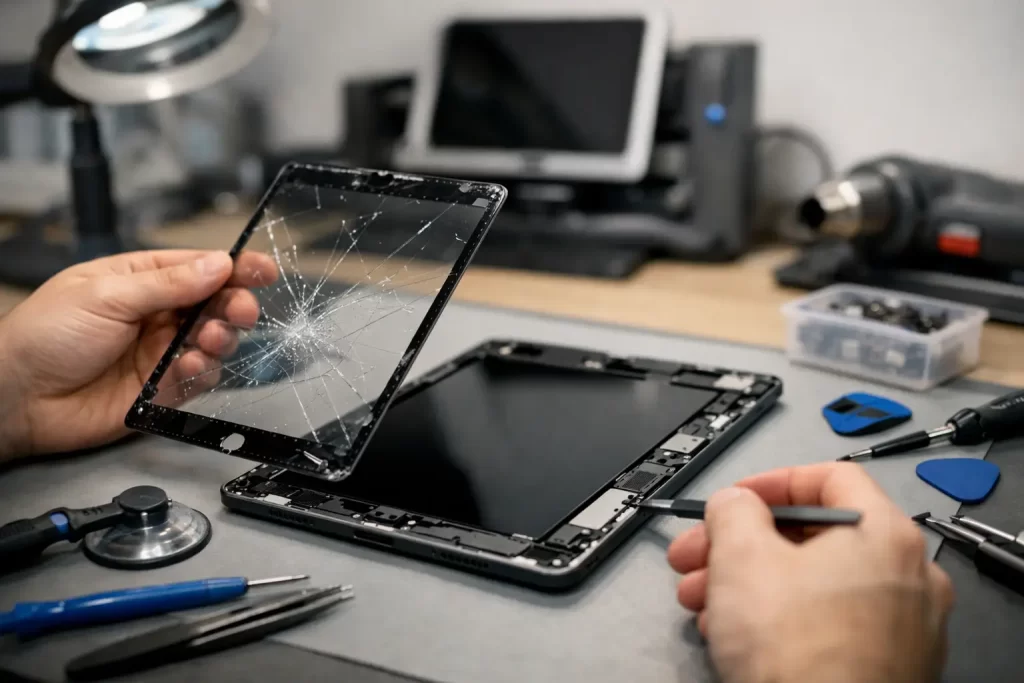
A cracked iPad screen is more than an annoying line across the display. It can make schoolwork hard to read, cut small fingers on broken glass, stop touch controls from responding and turn a work tablet into dead weight. This iPad screen replacement guide explains what has likely failed, when a screen repair is the right move and what to expect before handing over your device.
Is the iPad screen actually broken?
The obvious sign is cracked glass after a drop. But iPad screen faults are not always that simple. Your screen may look intact while the display shows coloured lines, dark patches, flickering, a permanently black image or a white glow around the edges. You may also see ghost touches, where the iPad opens apps or types by itself, or find that one section no longer responds to your finger or Apple Pencil.
These symptoms point to different faults. On some iPad models, the outer glass digitiser and LCD or OLED display are separate components. If the glass is cracked but the picture and touch function are normal, a digitiser-only repair may be possible. On newer models, the glass, display and touch layer are commonly bonded together. A crack, dead touch area or image fault may require a complete display assembly.
That difference matters to the price, parts required and repair time. A proper diagnosis avoids paying for a full display when the damage is limited, but it also avoids fitting glass-only parts to an iPad with a damaged panel underneath.
Do not ignore a cracked screen
An iPad can keep working after a minor crack, but using it as normal has risks. Loose shards can worsen, moisture and dust can enter through the damaged front, and pressure from a case or bag can turn a small crack into a failed display. If the screen has sharp edges, cover it temporarily with a screen protector or clear tape and keep it away from children until it is repaired.
If the tablet was dropped hard, check more than the glass. Test the cameras, speakers, charging port, buttons and Wi-Fi. A bent frame, battery swelling, intermittent charging or a screen that repeatedly goes black can indicate impact damage beyond the display. Screen replacement alone will not solve a logic board fault, damaged connector or bent housing.
A swollen battery needs prompt attention. Do not press the screen back down, charge the iPad overnight or try to puncture or flatten the battery. Stop using it and arrange an assessment.
iPad screen replacement guide: repair or replace?
For most people, repair makes sense when the iPad is otherwise reliable and still suits how they use it. A screen replacement can give a well-performing tablet several more useful years, especially for family use, streaming, Point of Sale, study or travel.
Replacement may be the better value if the iPad is already slow, cannot run the apps you need, has very limited storage, suffers multiple hardware faults or needs expensive board-level work after liquid damage. It depends on the model, its age and the condition of the rest of the device. An older iPad with only cracked glass is a very different decision from one with a cracked screen, failing battery and charging issue.
Before approving a repair, ask for a clear assessment of the visible damage and any likely extra work. A good repairer should explain whether the quote covers the digitiser only or the complete display, whether the frame needs straightening, and what happens if hidden damage is found once the device is opened.
Why iPad screens are not a simple DIY job
Online repair kits make an iPad screen swap look quick. In reality, iPads are tightly assembled with strong adhesive, delicate flex cables and batteries sitting directly below the display. Excess heat can damage the LCD, battery or nearby components. A misplaced pry tool can tear a cable, crack the panel further or cause board damage.
Older iPads can be particularly unforgiving. Their digitiser cables may sit close to the edge where the glass is lifted, while some newer designs need careful transfer of small components and precise adhesive fitting. If the frame is bent, a replacement screen may not sit flat and can crack again under normal pressure.
There is also the quality question. Cheap parts can have poor brightness, dull colour, reduced touch accuracy, weak adhesive or fitment gaps. A professional repair is not just about removing broken glass. It is about using a suitable-quality part, protecting the internals, restoring the seal and testing the device properly afterwards.
What a professional repair should include
A screen repair should begin with testing. The technician needs to confirm the iPad powers on, responds to touch, charges and displays an image before work starts where possible. This creates a clear baseline and helps identify pre-existing faults.
The damaged screen is then removed with controlled heat and the right tools. Adhesive residue and broken glass are cleaned away, the frame is inspected and any debris near the front camera, home button or sensors is removed. The replacement part is fitted, connected and tested before final sealing.
At minimum, the post-repair checks should cover touch response across the entire screen, display brightness and colour, charging, cameras, speaker and microphone function, buttons, Wi-Fi and Bluetooth. If your model supports Apple Pencil, test that as well. A screen that turns on is not necessarily a screen repair done properly.
At iSmashed, repairs are assessed with the wider device in mind. If testing points to a charge-port fault, backlight failure, liquid damage or a logic board issue rather than a screen-only fault, that should be identified before you spend money on the wrong repair. Some faults need advanced diagnostics, micro-soldering or data recovery work rather than another display.
How long does iPad screen replacement take?
Many straightforward screen repairs can be completed quickly, often in under an hour when the correct part is available and the frame and internals are in good condition. However, no repairer should promise a fixed time without seeing the device. iPad model, stock availability, adhesive cure time, a bent housing, water damage and hidden impact faults can all extend the job.
If you rely on the iPad for work, ask about turnaround before booking. Darwin customers often need a practical answer: can the repair be done around a shift, a class or travel plans? A repair service that offers an in-store Darwin CBD option and free come-to-you service can reduce downtime, but the repair environment still needs to be suitable for safe, clean work.
Back up the iPad before repair if it still works. Use iCloud or a computer, and make sure you know the device passcode and Apple Account details. Most screen repairs do not require data deletion, but a current backup is sensible before any device is opened. Never share account passwords unnecessarily.
Questions to ask before you book
Price matters, but the cheapest quote can become costly if the part fails early or a fault is missed. Get clarity on the model being repaired, the type of screen part being installed, the expected turnaround and the warranty terms. A clear 3-month parts warranty gives you a defined path if a covered part issue appears after repair.
Also ask whether the quote changes if the frame is bent or the display damage is deeper than first expected. This is common after a hard drop. Transparent communication is the difference between an unexpected bill and an informed decision.
Once repaired, use a fitted case with a raised lip and a quality screen protector. It will not make an iPad indestructible, but it can absorb the small impacts that cause most repeat cracks. If your display is already broken, act before a simple front-glass repair becomes a larger device problem.