
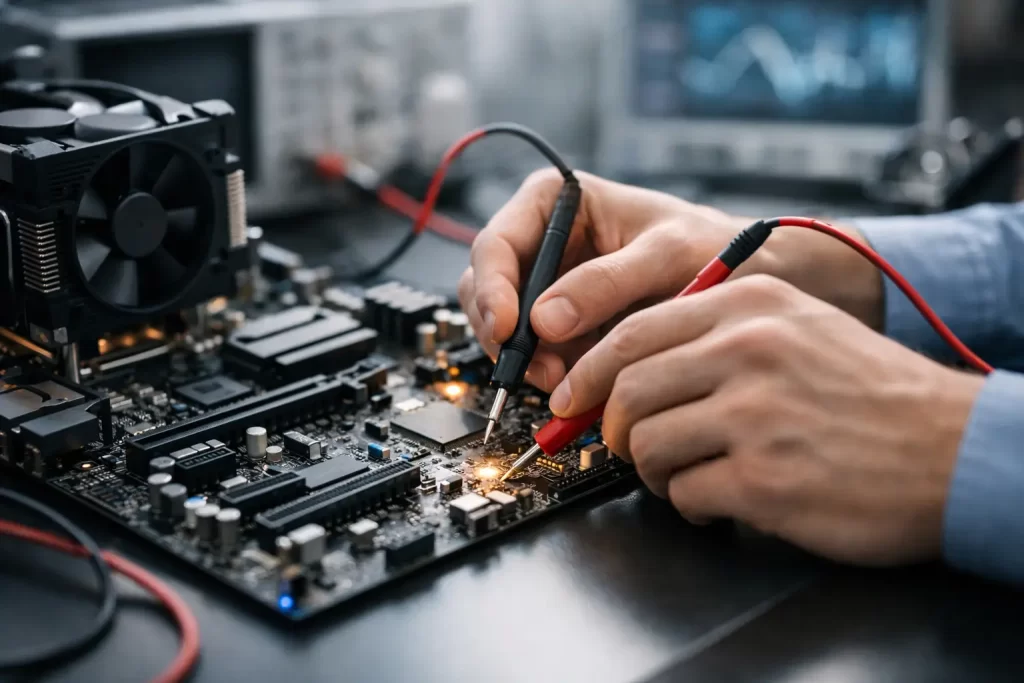
A phone that will not charge, a laptop with no display, a console that powers on then dies – most people call it “dead”. In repair terms, that is where motherboard diagnostics explained clearly makes a real difference, because the board is often the actual fault point, not the battery, screen, or charging cable.
When a device stops working properly, the motherboard is the part that ties everything together. It manages power, communication between components, storage access, charging behaviour, and startup. If that board has a fault, the symptoms can look random. One day the phone restarts on its own. The next day it gets hot near the charging port. Then it stops turning on altogether. Good diagnostics are how you separate a simple part failure from a board-level problem.
What motherboard diagnostics explained clearly really means
At its simplest, motherboard diagnostics means testing the board to find where the failure is happening and why. That sounds obvious, but there is a big difference between guessing and diagnosing.
A basic repair shop might swap the battery, test a charger, or replace an obvious broken part. That is fine when the problem is straightforward. Board diagnostics go further. A technician checks power lines, short circuits, charging behaviour, current draw, damaged components, corrosion, failed chips, missing voltages, and signs of previous poor repair work.
The goal is not just to identify that the motherboard is faulty. The goal is to locate the exact area of failure. That might be a charging IC, a shorted capacitor, a damaged backlight circuit, a failed audio chip, liquid damage around a connector, or a CPU-related issue that makes repair less viable.
That distinction matters because accurate diagnosis saves time, avoids unnecessary part replacement, and gives you a clearer answer on whether the device is worth repairing.
Why motherboard faults are often misread
Board faults rarely announce themselves neatly. A dead phone can still have a healthy screen and battery. A laptop with no image might have a working display panel but a failed backlight circuit. A tablet that only charges at one angle may not need a new battery at all – it could be charge-port damage or a board fault on the charging line.
This is why symptom-based guessing can waste money. The same symptom can come from several different faults.
Take boot looping as an example. It could be software corruption, storage failure, power instability, a damaged line on the board, or liquid residue causing an intermittent short. Water damage is another common trap. A device may appear to recover after drying out, then fail a week later once corrosion spreads under shields or around fine-pitch components.
That is where proper board-level testing matters. It tells you whether the issue is isolated and repairable, or whether the failure has spread into more critical areas.
Common signs your device needs motherboard diagnostics
Some faults point more strongly to the motherboard than others. If a device is completely dead, stuck on a logo, not charging despite multiple cables and chargers, overheating quickly, showing no image with sound still present, or repeatedly restarting, board diagnostics are usually the next sensible step.
The same applies if the device has had liquid exposure, a heavy drop, power surge damage, or a previous failed repair attempt. We also see plenty of cases where someone has already replaced the battery, screen, or charging port and the original problem is still there. That usually means the issue was deeper from the start.
For small businesses and anyone relying on a work phone or laptop, this matters because downtime adds up fast. You do not just want a part changed. You want the actual fault found.
How a technician approaches motherboard diagnostics
A proper diagnostic process starts with the symptom history. What happened before the failure? Was there a drop, liquid spill, sudden shutdown, fake charger, overheating event, or intermittent charging issue? These details help narrow the likely fault area.
Next comes physical inspection. A technician checks for cracked connectors, burnt components, corrosion, lifted pads, pry damage, and signs of previous tampering. On many devices, the damage is not visible until shields are removed and the board is inspected under magnification.
After that, electrical testing starts. This may include current draw testing with a DC power supply, diode mode measurements, resistance checks on power rails, charge-line testing, thermal inspection to find hot components, and verifying that key voltage lines are present when the device attempts to boot.
If needed, the board is separated further for micro-soldering work. That can mean removing shields, replacing damaged components, reworking connectors, or isolating shorted lines. In some cases, a chip-level issue can be repaired cleanly. In others, the damage is too extensive or tied to critical paired components, making the repair less economical.
That is the part many customers appreciate – a real diagnosis gives you a decision point, not just a bill.
Motherboard diagnostics explained clearly for common devices
Phones are the most common board-diagnostic jobs because they are exposed to drops, pocket moisture, cheap cables, and constant charging cycles. Typical faults include charge IC failure, backlight damage, no touch after impact, audio IC faults, face ID or camera line damage, and corrosion after liquid exposure.
Laptops and MacBooks present differently. They may show no power, no image, battery not detected, keyboard lines failing, random shutdowns, or charging issues tied to USB-C circuitry. On these devices, board diagnostics often determine whether the machine needs a simple component repair or whether data recovery should be prioritised before the fault worsens.
Gaming consoles also benefit from board-level diagnosis. A PS5 with no display may have an HDMI port problem, but the board itself can also be damaged around the encoder or filter area. A console that shuts down under load may point to power delivery faults rather than a simple fan issue.
Each category needs different experience. The principles are similar, but the failure patterns and repair paths are not identical.
When repair is worth it – and when it is not
Not every motherboard fault should be repaired. That is the honest part.
If the fault is isolated, such as a shorted capacitor, damaged connector, charging circuit issue, or localised corrosion, repair can be very worthwhile. It is often faster and cheaper than replacing the entire device, especially when the data matters.
If the board has severe liquid damage across multiple areas, heavy layer damage, CPU or memory failure, or serious previous repair damage, the success rate drops. Sometimes the smarter move is data recovery first, then replacement planning.
This is why clear diagnostics matter more than promises. The right technician should tell you what is likely, what is risky, and whether the repair makes financial sense.
What customers should ask before approving a board repair
Ask whether the issue has been confirmed at board level or is still a suspected fault. Ask if the diagnostic process includes charge testing, current draw analysis, and inspection for liquid or previous repair damage. Ask whether the repair is likely to preserve data, and whether there is any risk of the fault worsening during testing.
It is also worth asking about turnaround and warranty. Board work is more specialised than a standard screen replacement, so timing can vary depending on fault complexity and parts availability. A good repairer will be upfront about that rather than overpromising.
For Darwin customers dealing with urgent device failures, that clarity matters. At iSmashed, the value in diagnostics is simple: find the real fault fast, avoid wasted part swaps, and give you a practical path back to a working device.
Why clear diagnosis saves money
The cheapest quote is not always the cheapest outcome. If a shop replaces two or three parts without fixing the problem, you are paying for trial and error. Worse, poor board handling can create new damage.
A proper diagnostic fee often saves money because it narrows the fault early. It also protects devices that still have recoverable data. That is especially important for phones with family photos, business contacts, or two-factor authentication apps, and laptops carrying study or work files.
When motherboard diagnostics are done properly, you get more than a technical answer. You get a realistic repair plan, a better idea of timing, and fewer surprises.
If your device is showing signs of a deeper fault, do not wait for it to fail completely. Early testing usually gives you more repair options, and sometimes the difference between a straightforward board fix and a full data-recovery job is just a few days.